Convoe is now on iOS
Back to Blog
Construction Mar 30, 2026 11 min read

Construction Punch List App | Track Defects

Stop defects slipping through handover. A construction punch list app that tracks snagging items with photos, assignments, and deadlines. Free early...

Convoe Team

A single missed defect at handover can cost you weeks. Not hours. Weeks. Between rework coordination, subbie callbacks, client disputes, and delayed practical completion, the cascade from one overlooked crack or unfinished paint edge adds up fast. Industry data suggests defect rework can consume 5-12% of total project costs on commercial builds. On a $2M fit-out, that's $100K-$240K bleeding out because someone scribbled "fix door" on a clipboard and it never got actioned.

If you're still running punch lists on spreadsheets, WhatsApp photos, or paper checklists, you already know the problem. Items get lost. Photos have no context. Nobody knows who's responsible or when it's due. A proper construction punch list app changes that entirely.

This guide breaks down what punch list management actually looks like when it works — and how to stop defects from torpedoing your handover.

What Is a Construction Punch List?

A punch list (also called a snagging list or defect list) is a document created near the end of a construction project that identifies work not completed to specification, or defects that need fixing before practical completion and handover to the client.

Think of it as the last line of defence between your team's work and the client signing off.

Typical punch list items include:

  • Surface defects: Scratches on joinery, paint touch-ups, chipped tiles
  • Incomplete work: Missing trims, unfinished caulking, fixtures not installed
  • Functional issues: Doors that don't close properly, leaking taps, faulty switches
  • Specification deviations: Wrong colour, wrong material, dimension errors
  • Safety items: Missing handrails, unfinished fire seals, incomplete signage

On a standard residential build, you might have 50-150 punch list items. A commercial fit-out? Easily 300-500. Each one needs to be logged, photographed, assigned, tracked, and verified as complete.

That's not a clipboard job. That's defect tracking construction teams need a system for.

Why Spreadsheets and WhatsApp Fail for Punch Lists

Here's a scene that plays out on sites every week.

The WhatsApp spiral. A site supervisor walks a level, spots 23 defects, takes photos on their phone, and sends them to the WhatsApp group. The photos land between messages about tomorrow's concrete pour, a question about steel delivery, and someone's lunch order. Three days later, the plasterer says he never saw the photos. He did. They just got buried under 200 messages.

Most construction teams default to one of three approaches for punch list management — and all three have the same failure point.

The Spreadsheet

Someone builds a spreadsheet with columns for location, description, subbie, status, and due date. It lives on a shared drive. Problem: nobody updates it in real time. The supervisor marks items on-site using a printed copy, then manually enters them back into the spreadsheet at 7pm after a 10-hour day. Half the entries are vague. "Fix wall — Level 3." Which wall? What's wrong with it?

No photos. No accountability trail. No mobile access that actually works on-site.

The WhatsApp Group

Photos go to the group chat. Descriptions are verbal. Assignments are implied ("Davo, sort that out yeah?"). There's no status tracking. No due dates. No way to filter what's done versus what's outstanding. When the client asks for a defect status report, someone has to scroll through 2,000 messages to piece it together.

That's not construction team communication — it's chaos with a group chat skin.

The Clipboard

Paper punch lists get created during the walkthrough. They're thorough. They're also a single physical copy that can't be shared, updated, searched, or reported on. When the subbie loses the page or claims they never received it, you've got no proof.

All three methods share the same core problem: the gap between where defects are identified and where they get tracked is too wide. Information degrades every time it crosses that gap.

What a Good Punch List System Actually Needs

Forget feature lists. Here's what matters on-site, at 6:30am, standing in a half-finished bathroom with concrete dust on your phone screen.

1. Photo Capture With Context

Every defect needs a photo. But a photo without context is useless. Your construction punch list app needs to attach photos directly to a defect item — with location, description, and timestamp baked in. Not floating in a chat thread somewhere.

2. Clear Assignments

"The plasterer will fix it" means nothing if you can't see who's assigned, when they were notified, and whether they've acknowledged the item. Each defect needs a named person responsible.

3. Deadlines and Priority

Not all defects are equal. A cracked window is a day-one fix. A minor paint scuff can wait. Your system needs due dates and priority levels so subbies know what to hit first.

4. Status Tracking

Open. In Progress. Complete. Verified. Four states. Simple. Everyone should be able to see the current status of every item without asking. A proper task management system makes this automatic.

5. Mobile-First Access

Your supervisor is not sitting at a desk. They're on a scaffold, in a service duct, or walking a roof. The system needs to work on a phone, on spotty site Wi-Fi, with dirty fingers on a cracked screen. If it doesn't work mobile-first, it doesn't work.

6. Reporting and Filtering

When the client's project manager asks for a defect status update on Level 4, you need to filter and export that in 30 seconds. Not spend an hour compiling it from chat messages and spreadsheet tabs.

How to Run a Punch List Walkthrough: Step-by-Step

Whether you're managing a residential handover or a multi-level commercial build, the process follows the same structure. Here's how to run it properly.

Step 1: Schedule the Walkthrough Early

Don't wait until the day before handover. Schedule your internal punch list walkthrough 2-3 weeks before practical completion. This gives your subbies time to actually fix things.

Pro tip: do a pre-punch walkthrough 4-5 weeks out. Catch the big items early. The formal punch list should be for final details, not discovering the tiler never came back to finish the ensuite.

Step 2: Prepare Your Zones

Break the site into zones — by level, by apartment, by area. Each zone gets walked systematically. Random walkthroughs miss things. Structured walkthroughs don't.

Create your zones in your construction punch list app before you start. Label them clearly: "Level 2 — Unit 4 — Bathroom" not "upstairs bathroom."

Step 3: Walk and Log Simultaneously

Here's where mobile access matters. Walk the zone. Spot the defect. Photograph it. Log it — location, description, trade responsible — right there on your phone. Don't write it on paper to enter later. Don't send it to WhatsApp to sort out tonight. Log it now, in the system, with the photo attached.

A real scenario. A site super on a 40-unit residential project in Western Sydney ran his punch list through WhatsApp for the first three buildings. Average defect resolution time: 18 days. He switched to logging items directly into a task-based system with photo attachments and assignments for the remaining buildings. Resolution dropped to 6 days. Same subbies. Same project. Different system.

Step 4: Assign and Notify Immediately

As you log each defect, assign it to the responsible subbie or trade. They should get a notification — on their phone — with the photo, location, and due date. No excuses about not knowing.

If your system supports real-time chat threads per defect, even better. The subbie can ask questions, confirm they've seen it, or flag issues without calling you.

Step 5: Set Deadlines by Priority

Critical defects (safety, functional, client-visible): 48 hours. Standard defects (cosmetic, minor): 7 days. Low-priority (won't-affect-handover): 14 days.

Be specific. "ASAP" is not a deadline. "Friday 4pm" is.

Step 6: Verify and Close

When a subbie marks an item complete, someone needs to verify it on-site. Walk to the defect. Check the fix. Mark it verified. This step gets skipped constantly — and it's why defects reappear at client walkthroughs.

Build verification into your workflow. Don't let subbies self-verify their own punch list items.

Step 7: Generate the Handover Report

Once all items are verified, export your defect register. This becomes part of your construction handover checklist and practical completion documentation. A clean punch list report — with photos, dates, and verification stamps — is the difference between a smooth handover and a dispute.

Your Punch List Checklist

Use this as your go-to reference for every punch list walkthrough.

Pre-Walkthrough

  • [ ] Walkthrough scheduled 2-3 weeks before practical completion
  • [ ] Site zones defined and labelled in your system
  • [ ] All relevant subbies notified of walkthrough date
  • [ ] Punch list app installed and tested on mobile devices
  • [ ] Previous defect items from pre-punch reviewed

During Walkthrough

  • [ ] Systematic zone-by-zone inspection
  • [ ] Each defect photographed with context (wide shot + close-up)
  • [ ] Location recorded: building, level, unit, room, element
  • [ ] Description specific: "30mm crack in plasterboard, south wall, above door frame" not "crack in wall"
  • [ ] Trade and subbie assigned per item
  • [ ] Priority set: Critical / Standard / Low
  • [ ] Due date assigned per item

Post-Walkthrough

  • [ ] All items synced and visible to assigned subbies
  • [ ] Subbies confirmed receipt and acknowledged items
  • [ ] Follow-up walkthrough scheduled for verification
  • [ ] Client walkthrough date confirmed
  • [ ] Escalation path defined for overdue items

At Handover

  • [ ] All Critical and Standard items verified complete
  • [ ] Defect register exported with photos and timestamps
  • [ ] Client walkthrough completed with documented sign-off
  • [ ] Remaining Low-priority items captured in post-handover defects register
  • [ ] All documentation filed in project records

How Convoe Handles Punch List Workflows

Most construction punch list apps are standalone tools. Another login. Another app your subbies won't download. Another system that doesn't talk to your existing comms.

Convoe works differently. It's built on the idea that construction project management should live where your team already communicates — not in a separate tool nobody opens.

Here's how punch list management works inside Convoe.

Chat Threads Per Defect

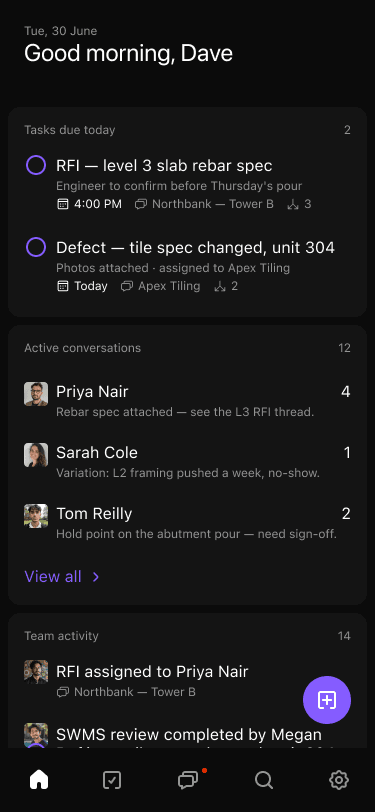
When you log a defect, it creates a task with a dedicated chat thread. The assigned subbie gets notified. They can view the photo, read the description, ask questions, and confirm they're on it — all in one thread. No more hunting through a group chat with 47 people in it.

Assign to Subbie With One Tap

Each defect task gets assigned to a person. They see it on their task list. They get a push notification. There's a clear record of who was assigned, when, and whether they acknowledged it.

Photo Attachments That Stay Attached

Photos live on the task, not in a chat stream. When you need to see the photo of the cracked tile in Unit 7, you open the task. It's right there. Not buried under 300 messages in a WhatsApp group.

Task Tracking With Status

Every punch list item has a status. Open. In Progress. Complete. Your project dashboard shows you exactly how many items are outstanding, by zone, by trade, by priority. That client status update that used to take an hour? Thirty seconds.

Kai Catches What You Miss

Convoe's AI assistant Kai reads your team's conversations and identifies action items automatically. When your foreman messages "tell Davo the downpipes on Level 3 need redoing before Thursday," Kai creates a task, assigns it, and sets a deadline. No manual entry. No items lost in chat.

That's the gap where most defect tracking construction workflows fail — the space between a conversation and a tracked task. Kai bridges it.

One App, Not Five

Your team is already in Convoe for daily communication, task management, and scheduling. Punch lists live in the same place. No extra app to download. No extra login for your subbies to forget. One app that handles everything construction teams need.

A real scenario. A fit-out contractor in Melbourne was running punch lists across three tools — Excel for logging, WhatsApp for photos, and email for client reporting. Their PM spent 6-8 hours per week just compiling and reconciling defect data across systems. After consolidating into a single task-based workflow with chat threads per item, that dropped to under 2 hours. Same volume of defects. Less admin.

FAQ

What is a punch list in construction?

A punch list (also called a snagging list or defect list) is a document created near practical completion that identifies unfinished or defective work items that need to be corrected before handover. It typically includes descriptions, photos, locations, assigned trades, deadlines, and status tracking for each item.

What's the difference between a punch list and a snagging list?

They're the same thing. "Punch list" is the standard term in Australian and American construction. "Snagging list" is more common in the UK and parts of Europe. Both refer to the process of identifying and tracking defects before handover.

Can I use a construction punch list app on-site without Wi-Fi?

It depends on the app. Look for apps that support offline mode — letting you log items, take photos, and assign tasks without connectivity, then syncing when you're back online. Mobile-first design is critical for any app used on construction sites.

How many punch list items are normal for a project?

It varies by project size and type. A standard residential build might generate 50-150 items. A commercial fit-out or multi-level residential project can easily reach 300-500 items. The key isn't the number — it's having a system that tracks every item to verified completion.

When should I start the punch list process?

Start with a pre-punch walkthrough 4-5 weeks before practical completion to catch major items early. The formal punch list walkthrough should happen 2-3 weeks before handover, giving subbies adequate time for remediation before the client walkthrough.

How do I get subbies to actually use a punch list app?

Pick a tool they're already using. If your subbies are in your team chat daily, punch lists should live in the same app. The biggest barrier to adoption is asking tradespeople to download and learn yet another standalone tool. A system that combines communication and task tracking — like Convoe — removes that barrier entirely.

Stop Losing Defects at Handover

Every defect that slips through your punch list process is a cost — in rework, in time, in client trust. The fix isn't working harder. It's closing the gap between where defects are identified and where they get tracked.

Spreadsheets lose context. WhatsApp buries items. Clipboards can't be shared. A proper construction punch list app keeps every defect photographed, assigned, tracked, and verified — in one place your whole team already uses.

Convoe gives construction teams chat, task tracking, and AI-powered defect capture in a single mobile-first app. No extra tools. No extra logins.

Get Early Access to Convoe — Free, no credit card required.

Ready to try Convoe?

Turn your team conversations into tracked tasks, automatically.