Convoe is now on iOS
Back to Blog
Construction Apr 27, 2026 11 min read

RFI Management for Small-Medium Builders: What Actually Works

RFIs killing your programme? See how small-medium builders manage RFIs without Procore or expensive software. Free trial available.

Convoe Team

You're standing on site at 8:45am. Your framer has a question about the beam specification — the drawings aren't clear on the connection detail at the ridge. He needs an answer before he can proceed.

You call the engineer. No answer. You send an email. You text. You go back to your framer and tell him to move to another area while you wait.

Three hours later, you still don't have an answer. Your framer has run out of alternate work. He goes home at 2pm — a full day's billing with four hours of productive output.

The engineer responds at 4:30pm. You've already left the site.

Tomorrow morning, your framer comes back. You brief him. He completes the work. But you've lost a day and a half to an RFI that should have taken two hours to resolve.

This is not an unusual story. On construction sites running without a structured RFI process, this kind of delay happens two or three times a week. For small-medium builders without the overhead to absorb it, it's the difference between a profitable project and one that bleeds.


What Is an RFI and Why Does It Matter?

An RFI — Request for Information — is a formal question raised during construction when drawings, specifications, or contract documents are unclear, contradictory, or incomplete.

Every construction project generates RFIs. Dozens of them, sometimes hundreds. Residential builds typically generate 20-80 RFIs. Commercial fitouts can run to 300+. Each one represents a gap in the design documentation that has to be resolved before work can proceed — or, if work proceeds without resolution, a risk that the wrong decision was made.

RFIs are not optional busywork. They serve four critical functions:

  1. Clarification: Getting clear answers to design questions before you commit work to a wrong interpretation
  2. Documentation: Creating a formal record of every design clarification — vital in disputes
  3. Programme protection: Identifying design gaps before they become site delays
  4. Liability management: Establishing who made which decisions, and when

When RFIs are managed well, they catch problems early. When they're managed poorly — or not at all — those problems surface during construction, at handover, or worse, after practical completion.


Why Small-Medium Builders Struggle Most With RFIs

The tools built for RFI management — Procore, Aconex, PlanGrid — are designed for large commercial builders. They're powerful, comprehensive, and priced for head contractors running $50M+ projects.

For a builder running four residential sites with one PM and two site supervisors, those tools are overkill. The setup is complex. The training takes weeks. The cost is prohibitive.

So small-medium builders default to what's available: email for formal RFIs, WhatsApp for quick questions, text for urgent clarifications, and phone calls for everything else.

The result is an RFI process that isn't really a process at all — it's a scattered collection of questions in different channels, with no central tracking, no visibility into status, and no audit trail.

Mini-Story: Craig runs a boutique construction company in Adelaide — 6 residential projects running simultaneously, projects ranging from $800K to $2.5M. His RFI process before implementing structure: email to the architect, follow-up text, phone call if no response, and a handwritten note on the drawings to remind himself what was outstanding. On a complex two-storey renovation project, he had 34 outstanding RFIs at one point and no clear record of which ones had been answered, which were still waiting, and which had been resolved verbally without documentation. At handover, the client disputed two items that had been resolved verbally — Craig had no written record of the answers. He ended up paying $14,000 in disputed rectification costs to avoid litigation. "I had the right answer. I just couldn't prove it."

The same problem plays out in hundreds of small-medium builder offices across Australia every month.


The Cost of an Unmanaged RFI Process

Before we talk about solutions, it's worth quantifying what a poor RFI process actually costs.

Programme delays

Each RFI that causes work to stop represents idle time — your crew, your subbies, your plant. On a residential build with 15 trades cycling through in sequence, a one-day delay in framing creates cascading delays across every subsequent trade.

Conservative estimate: a builder running four sites with an average of 2-3 RFI-related work stoppages per week is losing 8-12 working days per site per project. At $3,000-5,000/day in direct and indirect site costs, that's $24,000-60,000 per project in avoidable delays.

Dispute exposure

RFIs that were resolved verbally — or via WhatsApp message — leave no formal record. If a dispute arises (and in construction, disputes are common), you need to show that the right question was asked and the right answer was received. Without documentation, you're vulnerable.

Rework costs

When an RFI isn't raised and work proceeds on an incorrect interpretation, the result is often rework. Structural changes can cost 5-10x the original work. Finishing changes (incorrect tile, wrong fixture) cost 2-4x.

Cost of missed RFIs is one of the five biggest sources of preventable loss on construction sites, alongside missed task instructions and communication breakdowns.


What a Proper RFI Process Looks Like for Small-Medium Builders

You don't need Procore. You need a lightweight process that creates structure without overhead.

Here's what an effective RFI process looks like for a builder running 3-8 sites:

1. Single point of origination

Every RFI starts in one place — not across email, WhatsApp, text, and phone calls. Whether that's a dedicated channel in your project communication tool or a simple form, the question has to be formally raised with:

  • What the question is
  • Which drawings/documents it refers to
  • What work is being held up
  • Who needs to answer it
  • When you need the answer

2. Unique numbering

Every RFI gets a number. RFI-001, RFI-002. This sounds trivial, but it's essential. When you're tracking 40 outstanding RFIs across three projects, "the beam connection question" is useless. "RFI-023 on the Ridge Beam Connection at Grid D" is findable and referable.

3. Status tracking

At any given moment, you need to know which RFIs are:

  • Open: Raised, no response yet
  • Pending: Response received but not yet reviewed/actioned
  • Answered: Response received and applied
  • Overdue: Response needed by a date that has passed

This status visibility is the difference between proactive RFI management (following up before work stops) and reactive management (scrambling when the crew can't proceed).

4. Response documentation

When an RFI is answered — by the engineer, architect, or client — that answer needs to be recorded against the original question. Not in a separate email thread. Not in a WhatsApp message. Against the RFI, with the date and the respondent's name.

This is your documentation. This is what protects you in a dispute.

5. Task creation on resolution

When an RFI is answered, work can proceed. But "work can proceed" needs to translate into a specific task assigned to the right person. The answer to RFI-023 doesn't help your framer unless someone tells him: "RFI-023 is resolved, use the 200x45 F17 with a triple nail plate at the ridge — can you get that done before end of day?"

The RFI resolution becomes a task. That task gets tracked to completion.


How Convoe Simplifies RFI Management for Site Teams

Convoe isn't an enterprise construction platform. It's a communication and task tool built for how site teams actually work — chat-first, mobile-first, with AI that handles the admin.

Here's how site teams use Convoe for RFI management:

Raising RFIs in channel

Your site supervisor or foreman posts the RFI question in the project channel: "RFI-012 — Structural engineer to clarify connection detail at ridge beam, Grid D, Level 2. Work on hold until resolved. Need answer by Thursday COB."

Kai, Convoe's AI assistant, reads this and creates an RFI task — tagged as open, assigned to the engineer's contact, due Thursday. The original message is linked to the task. No manual data entry required.

Tracking RFI status

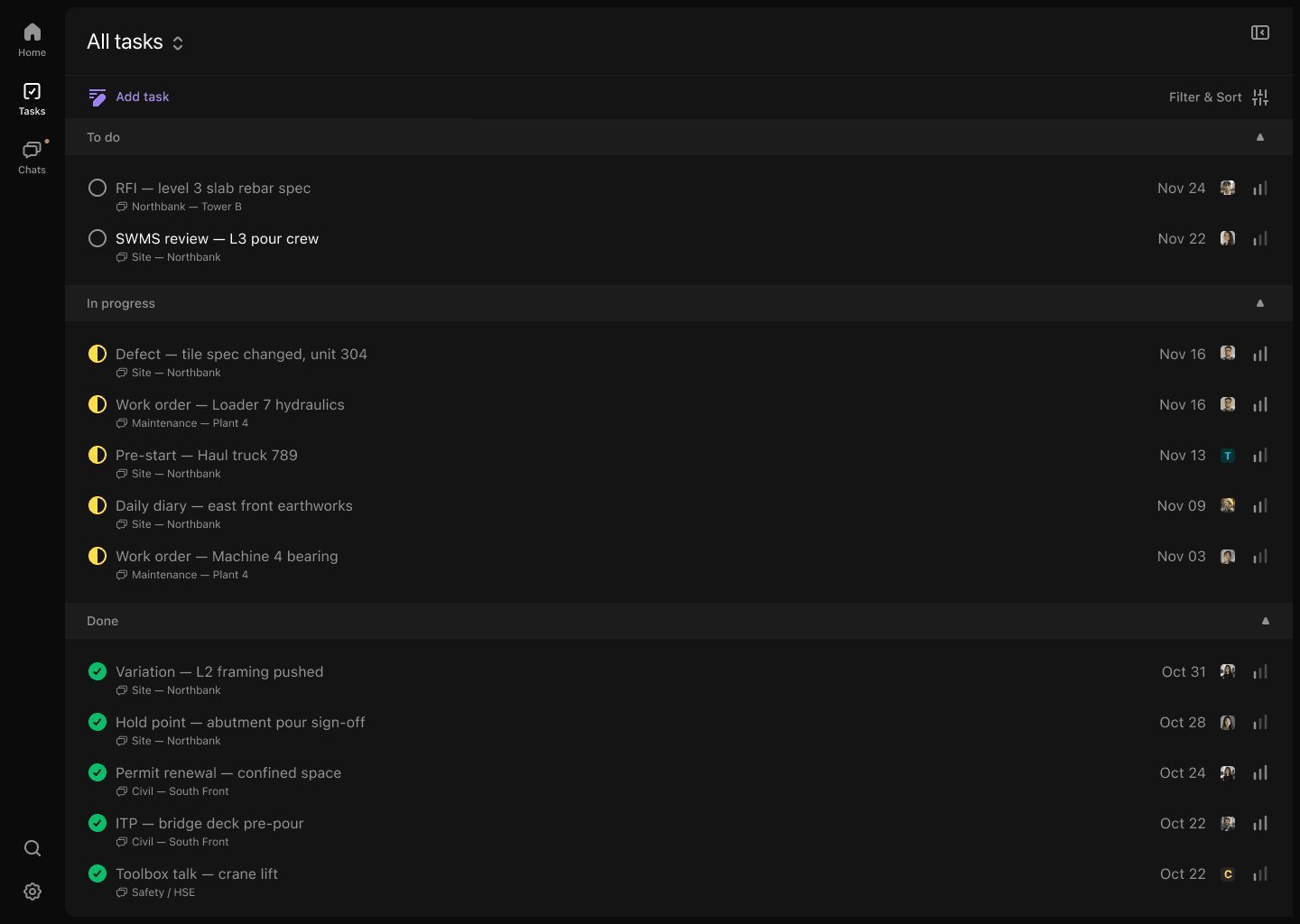
Your RFI task list shows every outstanding question, its status, and its due date. You can see at a glance which RFIs are overdue, which are pending response, and which have been resolved. This takes ten seconds to review — not ten minutes of scrolling email threads.

Recording responses

When the engineer responds, you post the answer in the same task thread. The response is documented against the original question, with a timestamp and the respondent's details. Your audit trail is complete.

Converting to site tasks

Once an RFI is answered, Kai prompts the creation of the resulting work task — assigned to the right subcontractor, with the RFI answer as context. The framer gets: "RFI-012 resolved. Use 200x45 F17 with triple nail plate at ridge. Action before Thursday."

No separate RFI log required. The task system is the RFI log. Everything is in one place, linked to the project conversation, searchable, and exportable.


Building Your RFI Register Without Enterprise Software

If you're not ready for a full platform, here's a lightweight approach you can implement this week.

Option 1: Dedicated channel with RFI thread

Create a dedicated channel in your project communication tool called "RFIs." Every RFI starts there with the format:

  • RFI number (you assign sequentially)
  • Question details
  • Drawings referenced
  • Work on hold
  • Required by date
  • Addressee

All responses go in the same thread. Closure is marked when work is confirmed completed.

This gives you a searchable, timestamped record of every RFI — better than email, infinitely better than WhatsApp.

Option 2: Simple spreadsheet RFI register + channel

A Google Sheet with: RFI#, Date Raised, Description, Addressee, Required By, Response Date, Status, Notes. Updated when RFIs are raised and closed. Takes 2 minutes per RFI.

Pair this with your project channel for the conversation, and you've got a basic but functional RFI process.

Option 3: Automated RFI tracking with Convoe

The channel conversation automatically generates and tracks RFI tasks. No spreadsheet required. Kai handles the creation, assignment, and status tracking. You review the dashboard. This is the least effort for the most rigour.

Mini-Story: Marcus runs three commercial fitout projects in Brisbane — office refurbishments ranging from $600K to $1.8M. He used to manage RFIs entirely by email, with a spreadsheet register that was perpetually out of date. He moved to Convoe six months ago. His RFI response times improved from an average of 4.2 days to 2.1 days — because outstanding RFIs were visible and had clear due dates, so follow-up happened proactively rather than reactively. "The engineer didn't suddenly get faster. We just stopped letting things sit there. When an RFI showed overdue in the dashboard, I'd call within the hour. That discipline came from having visibility." His last project finished four days ahead of programme.

The RFI Conversations That Should Never Happen on WhatsApp

Some conversations are too consequential for informal channels.

Structural questions: Any question touching load-bearing elements, beam sizing, foundation depth, or connection details. The answer changes what gets built. It needs to be documented.

Fire and safety compliance: Fire rating of elements, exit width, sprinkler coverage. These aren't design preferences — they're code requirements. If the question and answer aren't formally recorded, you have no evidence you sought clarification.

Scope change implications: When an RFI response changes the scope or cost of work, that needs to be captured formally. "The engineer said to use a larger beam" is not a documented scope change. An RFI with the engineer's response and a follow-up variation notice is.

Client design changes: When a client changes their mind during construction — the kitchen island moves, the window gets bigger — that needs to be an RFI or a formal instruction, not a WhatsApp message. Because when the invoice comes, you'll need to show where the instruction came from.

The accountability gap in WhatsApp-based construction communication is most dangerous in these moments. A platform where site communication becomes structured documentation protects you in exactly these situations.


Preventing RFIs Before They Happen: Pre-Construction Review

The best RFI is one that never needs to be raised.

Experienced construction PMs do a pre-construction drawing review specifically to identify likely RFI triggers before work starts. Here's a quick checklist:

  • Coordination clashes: Check structural vs. services. Look for beams crossing ductwork, columns interfering with wet areas.
  • Specification gaps: Are all materials specified? Are there items marked "by owner" or "TBC"?
  • Dimension inconsistencies: Check plan vs. elevation vs. section. Inconsistencies will become RFIs on site.
  • Connection details: Are all structural connections detailed? Missing connection details at complex junctions are common RFI sources.
  • Compliance references: Are all compliance references current? Outdated standards references create RFIs when inspectors ask questions.

Even a two-hour drawing review before construction starts will identify 10-20 likely RFI triggers. Getting answers before work begins costs a fraction of getting answers after work has stopped.


Getting Your Consultants to Respond Faster

Slow RFI response times are one of the most common complaints from site teams. Engineers and architects managing multiple projects don't always treat your RFIs as urgent.

Here's what experienced PMs do:

Set response time expectations in the contract. Many construction contracts don't specify RFI response times. Adding a clause (e.g., "Engineer will respond to RFIs within 48 hours or provide an interim response acknowledging receipt and providing an expected response date") changes the dynamic.

Include work-at-risk statements. In your RFI, specify what work is on hold and what it's costing per day. "Framing crew of 6 is on hold, costing $2,400/day from [date]" creates urgency without aggression.

Follow up systematically. An overdue RFI in your task management dashboard prompts a follow-up call. A buried email doesn't.

Copy the project manager. For critical RFIs, copying the client's representative creates accountability. Consultants respond faster when the client can see what's outstanding.


What Good RFI Management Looks Like at Project End

At practical completion, your RFI register tells a story.

  • How many RFIs were raised
  • Average response time from each consultant
  • Which RFIs caused programme delays and by how much
  • Which consultants were reliable and which were consistently slow
  • Which parts of the design generated the most questions (useful for next project's pre-con review)

That data has value beyond the current project. It informs your next tender (budget for expected RFI response delays), your next consultant selection (avoid engineers who take 5+ days to respond), and your next pre-construction review (check the areas of the design that generated the most questions).

A good RFI register isn't just a legal document — it's operational intelligence.


Start Managing RFIs Like a Builder Who's Got It Figured Out

You don't need enterprise software. You don't need complex templates or extensive training.

You need:

  • A single place where RFIs are raised and tracked
  • Unique numbers and clear status visibility
  • Responses documented against the original question
  • RFI resolutions converted into site tasks
  • A habit of following up proactively when response times slip

Try Convoe free and run your next project's RFIs through a structured channel from day one. Your crew won't know the difference — they'll still be communicating the way they always have. But you'll have the record, the visibility, and the audit trail that turns a potential dispute into a two-minute phone call.

No credit card required. Ten minutes to set up your first project.

Ready to try Convoe?

Turn your team conversations into tracked tasks, automatically.