Back to Blog
Construction Jul 5, 2026 12 min read

Site Instruction Tracking for Construction Teams

Stop losing site instructions in chat. How to confirm verbal directions, run an instruction register, and turn every instruction into a tracked task.

Convoe Team

Tuesday, 7:20am, site meeting. The architect looks at the half-framed wall and says, "Move the switchboard 600 to the left — it clashes with the pantry joinery." Everyone nods. Nobody writes it down.

Sunday, 8:40pm. The client texts you directly: "We had a think over the weekend — can the ensuite niche go in the shower wall instead?"

Thursday arvo. The head contractor drops a line in the project WhatsApp group: "Revised set-out levels attached, work to these from tomorrow." It lands between a photo of a delivery docket and someone organising Friday smoko.

Three site instructions. Three different channels. Zero records. Three weeks later the sparky has roughed in to the old switchboard position, the niche is in the wrong wall, and there is a genuinely uncomfortable conversation happening about which set-out levels the concreter worked from. Everyone remembers the instructions. Everyone remembers them differently.

That is the site instruction problem, and it is one of the quietest ways construction projects leak money. Not through one catastrophic failure — through a steady drip of directions that were given, half-heard, acted on wrong or never acted on at all, with nothing written down to settle the argument later.

This guide covers what site instruction tracking actually involves: what counts as an instruction, why verbal directions are a trap, the confirmation habit that costs thirty seconds, the instruction register nobody maintains — and the modern version, site instruction to task, where every instruction becomes a tracked task with an owner, a date and the original message attached.

What Counts as a Site Instruction?

A site instruction is any direction that changes, clarifies or adds to the work. Keep the definition that broad on purpose, because instructions don't announce themselves.

They come from the architect, the superintendent, the client, the head contractor, the engineer. And they arrive in three forms:

  • Formal: a numbered SI on letterhead, a revised drawing issue, an email with "Site Instruction" in the subject line. Common on commercial jobs with a superintendent administering the contract. Rare everywhere else.
  • Semi-formal: an email or text that directs work without calling itself an instruction. "Client has confirmed the benchtop upgrade, go ahead." "Use the detail from the revised drawing." It reads like conversation. It's direction.
  • Invisible: the conversation at the boot of the ute. The phone call while you're driving between jobs. The comment on a walkthrough. Direction was given, the work will change, and no record exists anywhere except in two people's heads.

The trap is treating only the first category as real. Contractually, the formal ones are the cleanest — but on most jobs the invisible ones outnumber them ten to one, and they move real hours, real material orders and real sequence changes.

One more distinction worth keeping sharp: an instruction is not the same thing as a variation. An instruction directs you to do something. If doing it changes the scope, cost or time of the contract, it should trigger your variation process. But you can't run a variation process off an instruction you never captured. Ask anyone who has fought a variation claim: almost every disputed variation started life as an untracked instruction.

Why "He Told Me on Site" Never Holds Up

Most building contracts say instructions should be in writing. Most sites run on verbal instructions anyway. That gap — between what the contract requires and how the job actually runs — is where the trouble lives.

A verbal instruction isn't worthless. Work happens for a reason, and anyone who has sat through a payment dispute knows the whole course of conduct gets examined, not just the formal paperwork. But a verbal direction with no contemporaneous record turns into a memory contest: your recollection against theirs, months later, with money on the table.

And memory does what memory does. The architect remembers saying "look at whether the switchboard can move." You remember "move the switchboard." The client remembers asking what a niche in the shower wall would cost, not telling you to build one. Nobody is lying. Everyone is reconstructing. And the party holding the contemporaneous record wins the reconstruction almost every time.

The Confirmation Text: Your Minimum Standard

You don't need a contracts administrator following you around site. You need one habit: every verbal instruction gets confirmed in writing, same day, in one message.

Confirming instruction on site this morning from Sarah (architect): switchboard to move 600mm south to clear pantry joinery. We will proceed on this basis and advise any cost or time impact. Reply if that is not your understanding.

Thirty seconds on your phone, and it changes the whole shape of any later argument:

  • It creates a timestamp. The instruction now exists on a specific date, before the work — not in a statement written months later.
  • It names the issuer. "Someone said" becomes "Sarah instructed."
  • It forces correction at the cheapest possible moment. If you heard it wrong, they'll say so today — while the wall is still open — not at handover.
  • It reserves your position. "Will advise cost and time impact" keeps the variation door open without turning a Tuesday text into a contract negotiation.
  • Silence starts working for you. If they read it and say nothing, that silence is now part of the record.

Send it in whatever channel the other party actually reads — text, email, the project chat. The platform matters less than the discipline: the instruction now exists somewhere outside two people's heads.

The Instruction Register Nobody Maintains

Every project management course says the same thing: keep an instruction register. A numbered log of every direction received — who issued it, when, what it says, and what happened next.

Almost nobody maintains one. Not because builders are lazy, but because the register lives in a spreadsheet on the office computer, and instructions arrive on your phone at 6:50am, at the boot of the ute at 4pm, and in the group chat on Sunday night. The transcription step — copying the instruction from the phone into the spreadsheet — is the step that never survives a busy week.

FMI Corporation research found construction projects waste roughly 52% of working time on non-optimal activities, with poor communication a leading cause of rework. The instruction register is exactly the discipline that attacks that waste — and exactly the admin that gets dropped when the week gets loud. Both things are true, which is why the register needs to build itself. More on that below.

If you're running one manually, here is the minimum each entry needs:

  • Number and date. SI-014, 14 July, 7:20am. Numbering matters — it turns "that thing about the switchboard" into a referenceable item.
  • Who issued it. Name and role, not just the company.
  • How it arrived. Verbal on site, text, email, WhatsApp, marked-up drawing.
  • What it says. Exact words where you have them. Paraphrases are where disputes breed.
  • Cost or time flag. Does this change the contract? Yes, no, or to be assessed.
  • Owner and status. Who is actioning it, and where it sits: confirmed, priced, in progress, done.

Six fields. The register doesn't fail because it's complicated. It fails because it lives in the wrong place — a desk artefact for a phone-shaped problem.

The Modern Version: Every Instruction Becomes a Task

Here is the shift worth making: stop thinking "register" and start thinking "tracked task with the evidence attached."

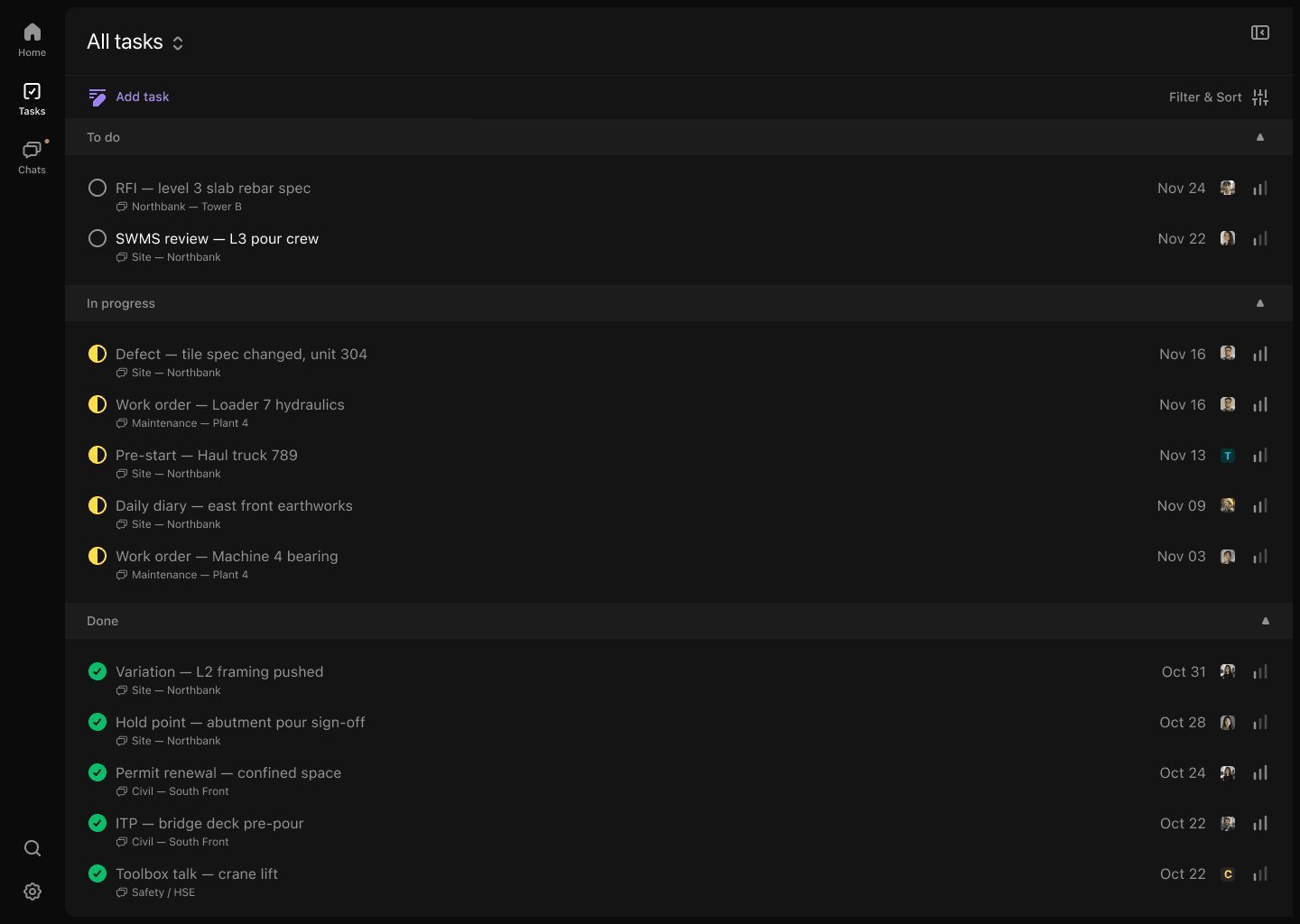
An instruction, captured properly, is just a task with three things on it: an owner, a date, and the source. Who is doing something about it, by when, and the original message that proves where it came from. If every instruction — spoken, texted or WhatsApped — became a task the moment it arrived, your instruction register would build itself as a by-product of the work.

That is exactly how Convoe treats site communication. Your crew keeps messaging the way they already do — photos, voice notes, the usual chaos — and Tai, the AI agent built for construction teams, reads the site conversations and turns directions into tracked tasks. The head contractor's "work to the revised levels from tomorrow" stops being a message that scrolled off the screen by smoko and becomes a task: assigned to your foreman, dated tomorrow, with the original message and attachment linked underneath.

Verbal instructions join the system the same way: you send your thirty-second confirmation text into the project channel, and it gets captured like everything else — the message becomes the task, and the task carries the message.

Two details make this work on a real site. First, it's mobile-first — half your crew never sits at a desk, and a system that needs a desk is a system that misses the people actually receiving the instructions. Second, nothing about the crew's behaviour has to change. The discipline problem that kills manual registers — transcribe it later, at a desk — is gone, because there is no transcription step.

And when you want the register view, it's just there: every instruction-derived task, filterable by project, each one carrying its source message, its owner and its status. The thing the textbook told you to maintain, without the maintaining.

What Site Instruction Tracking Protects You From

The payoff isn't tidiness. It's what happens at the four moments a builder gets tested.

At variation time

When an instruction changes scope, the variation gets priced from the record, not from memory. The tracked instruction is the anchor of the claim: what was directed, by whom, on what date, changing which detail. You're pricing off evidence — and the conversation with the client starts from "here is the instruction" instead of "remember when you asked for it?"

At dispute time

A timestamped chain — instruction received, confirmation sent, task created, work done, photos attached — is what turns "we never told you to do that" from a fight into a thirty-second lookup. Disputes are rarely won by the better argument. They're won by the better record. And every instruction that goes missing carries a real number with it — here is what a single missed task costs on site.

At handover

The as-built never matches the drawings exactly, and there is a reason for every departure. An instruction trail explains each one: the switchboard is 600 south of the drawing because SI-014 said so. Without the trail, every departure is presumed to be your error — and lands on your defect list.

With your own subbies

Instructions flow downhill. The architect instructs you; you instruct the sparky by text; if the sparky misses it, the rework bill still has your name on it. Tracking instructions as tasks means the chain — who was told what, when — extends to your subbies, and the follow-up happens before the plaster goes on, not after. Kai, the assistant built into every Convoe workspace, follows up on open commitments so you're not the one doing the chasing.

That is the real product of site instruction tracking: not paperwork, protection. It's the difference between being the builder with a story and the builder with a record. The construction setup is minutes, not a migration.

FAQ: Site Instruction Tracking

What is a site instruction in construction?

A site instruction is any direction issued on a project that changes, clarifies or adds to the contracted work — from an architect, superintendent, client, engineer or head contractor. It can be formal (a numbered SI, a revised drawing) or informal (a verbal direction, a text, a message in the project chat). If it tells you to build something differently, it's an instruction, whatever the format.

Do construction site instructions have to be in writing?

Most contracts require instructions in writing, and some let you insist on written confirmation before acting. In practice, verbal instructions happen on every job. The working rule: treat a verbal instruction as real — the work will proceed on it — and as unproven until you confirm it in writing the same day. Check your own contract; some set specific timeframes for confirming verbal directions.

How do I confirm a verbal instruction on site?

Same day, in writing, in one message: what was instructed, who instructed it, that you'll proceed on that basis, and that any cost or time impact will be advised. Text, email or project chat all work — what matters is a timestamp, a named issuer and a sentence inviting correction ("reply if that is not your understanding").

What should a site instruction register include?

Number, date, who issued it, how it arrived, what it says (exact words where possible), a cost or time flag, an owner and a status. The best register is the one that maintains itself — every instruction captured as a tracked task with the original message attached, so the log is a by-product of the work rather than a separate chore.

Is a site instruction the same as a variation?

No. An instruction is a direction to do something; a variation is a change to the contract scope, price or time. Plenty of instructions are simple clarifications with no cost impact. But when an instruction does change scope, it should trigger your variation process — and the captured instruction becomes the evidence your variation claim stands on.

What to Do This Week

  1. Audit a fortnight of your busiest project chat. Scroll back and count the directions — from the client, the architect, the head contractor — that never became a task or a register entry. That number is your current exposure.
  2. Save a confirmation template in your phone today. "Confirming instruction from [name] today: [detail]. Proceeding on this basis; will advise any cost or time impact. Reply if that is not your understanding." Use it on the very next verbal direction.
  3. Stand up a register — or a channel that behaves like one. Six columns in a spreadsheet beats nothing. One place where every instruction lands as a task with an owner and a date beats the spreadsheet.
  4. Close the loop at the next site meeting. Read back the week's instructions and their status. Count how many "oh, I thought—" moments happen while the wall is still open instead of at handover.
  5. Put Convoe on one project and let it do the capturing. Setup takes under 10 minutes, it's free during early access, and the crew keeps messaging exactly as they do now — the instructions just stop disappearing.

The instructions are already flowing — at the site meeting, in the group chat, in a Sunday-night text. The only question is whether each one becomes a tracked task with an owner and a date, or another thing everyone remembers differently in three weeks.


Get Early Access to Convoe — Free

No credit card required. Setup takes under 10 minutes. Built for construction teams running on mobile.

Ready to try Convoe?

Turn your team conversations into tracked tasks, automatically.